Storing Hashes in Redis
Explore how to store and manage Redis hash data structures with commands such as HMSET, HGET, HGETALL, HEXISTS, HDEL, and HSETNX. Understand how to insert, retrieve, check, and delete field-value pairs within Redis hashes for organized and efficient data handling.
We'll cover the following...
We know that the data in Redis is stored as key-value pairs. The value can also be a field-value pair. This is called the Hash data structure. Suppose we need to store the employee ID and name of all the employees within a department. In this case, we can use Hashes in Redis. The key will be the department name, and the value will be the empId-empName pair.
Let’s look at some of the commands used to insert and retrieve data from hashes in Redis.
HMSET command
The HMSET command is used to store a hash in Redis. The syntax of this command is:
HMSET key field value
In the example below, we are storing employee data in the finance department.
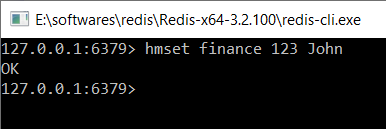
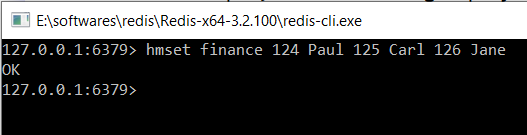
We can also store multiple field-value pairs in a single command, as shown below.
HGETALL command
This command is used to get all the field value pairs for a given key. The syntax of this command is:
hgetall key
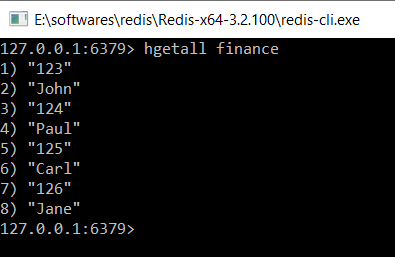
In the example below, we are finding all the employees in the finance department.
HGET command
We can use this command if we need to find the value of a particular field within a key. This is useful if the hash contains a lot of field-value pairs, and we don’t need them all. The syntax of this command is:
HGET key field
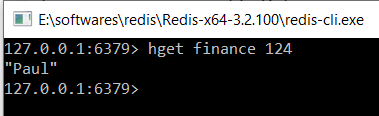
In the example below, we are finding the employee name for id 124.
Please try these commands in the terminal below:
hmset finance 123 Alex 124 Carlhgetall financehget finance 123
HEXISTS command
This command is used to check if a particular field exists in the database or not. The syntax for this is:
HEXISTS key field
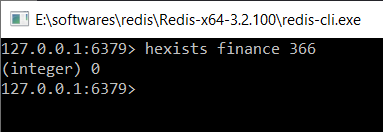
If the field does not exist, then this command returns 0, as shown below:
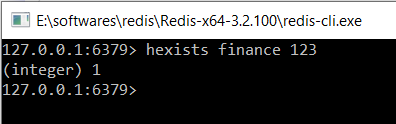
If the field exists, then this command returns 1, as shown below:
HDEL command
This command is used to delete a field from the hash. The syntax of this command is:
hdel key field
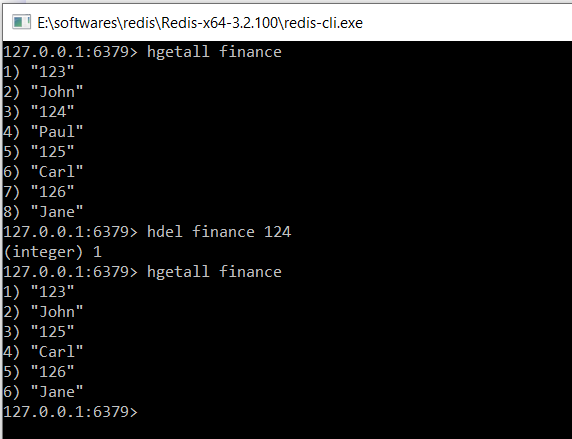
In the example below, we are deleting the employee with id 124.
HSETNX command
Suppose we already have some fields in our hash, and we use the HSET command, which updates the value. We can use the HSETNX command to fix this. This command will insert the field if it is not present. Otherwise, it will do nothing. The syntax of this command is:
HSETNX key field value
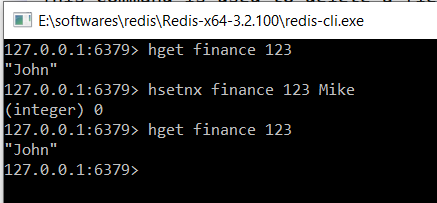
In the example below, we are inserting the employee with ID 123. Since it is already present, the value will not be updated.
Please try these commands in the terminal below.
hmset finance 123 Alex 124 Carl 125 Mikehexists finance 123hdel finance 125hsetnx finance 123 Mike