Shopping Cart Project Overview
Explore how to build a shopping cart in Blazor WebAssembly by adding and removing products with persistent state using the AppState pattern. Understand how to display the cart total dynamically on every page for a seamless user experience.
We'll cover the following...
We'll cover the following...
In this chapter, we will build a Blazor WebAssembly app that includes a shopping cart. We will be able to add and remove different products from the shopping cart. The cart's total will be displayed on each of the pages in the app.
The following is a screenshot of the completed application:

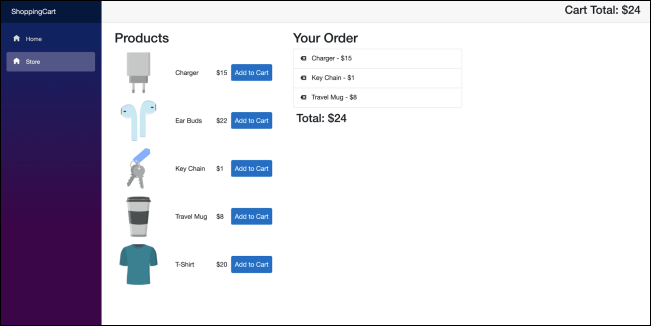
ShoppingCart app
ShoppingCart app
The following widget contains the complete code of the project. Press the “Run” button to execute it:
using ShoppingCart.Models;
using System;
using System.Collections.Generic;
using System.Linq;
using System.Threading.Tasks;

namespace ShoppingCart.Services
{
    public class CartService : ICartService
    {
        public IList<Product> Cart { get; private set; }
        public int Total { get; set; }

        public event Action OnChange;

        public CartService() { Cart = new List<Product>(); }

        private void NotifyStateChanged() => OnChange?.Invoke();
        public void AddProduct(Product product)
        {
            Cart.Add(product);
            Total += product.Price;
            NotifyStateChanged();
        }
        public void DeleteProduct(Product product)
        {
            Cart.Remove(product);
            Total -= product.Price;
            NotifyStateChanged();
        }
    }
}
ShoppingCart App