Kanban Board Project Overview
Explore how to build a functional Kanban board in Blazor WebAssembly, implementing event handling for drag-and-drop task organization across priority zones and enabling task addition.
We'll cover the following...
We'll cover the following...
The Blazor WebAssembly application that we are going to build in this chapter is a Kanban board. The Kanban board will have three dropzones: “High Priority,” “Medium Priority,” and “Low Priority.” We will be able to drag and drop tasks between the dropzones and add additional tasks.
This is a screenshot of the completed application:

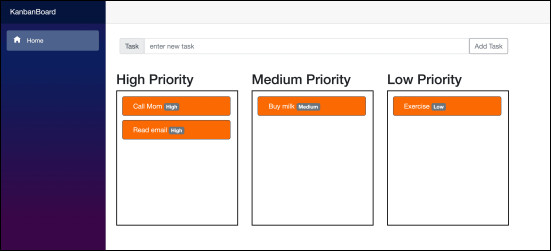
Kanban board app
KanbanBoard app
The following widget contains the complete code of the project. Press the “Run” button to execute it:
using System;
using System.Collections.Generic;
using System.Linq;
using System.Threading.Tasks;

namespace KanbanBoard.Models
{
    public enum TaskPriority
    {
        High,
        Medium,
        Low
    }
}
KanbanBoard app