Hypothetical Document Embeddings (HyDE): Simulating Context
Explore how hypothetical document embeddings (HyDE) enhance pre-retrieval optimization in RAG systems by simulating relevant context. Learn to generate embeddings, query vector stores, and implement HyDE using LangChain with practical code examples.
We'll cover the following...
Why hypothetical document embeddings (HyDE)?
Traditional document retrieval in RAG models relies on matching queries with existing documents in a collection. This approach faces limitations:
Limited generalizability: Existing retrieval methods often struggle with unseen domains or queries with subtle variations.
Factual accuracy: Retrieving documents based solely on keyword matching might lead to irrelevant or inaccurate information, especially for complex queries.
HyDE tackles these challenges by introducing the concept of hypothetical documents.
Educative Byte: Assume you are a student and preparing for a history test with lots of books to read. HyDE, like a smart study buddy, jumps in to lend a hand. It takes all that information and makes super helpful study notes just for you. These notes aren’t copies of the books, but they’re the most important bits you need to remember. For instance, if you’re studying World War II, HyDE might summarize the big reasons for the war, the major battles, and how it ended. HyDE’s summaries make studying much easier—you can understand the main ideas faster.
What is HyDE?
HyDE, as described in

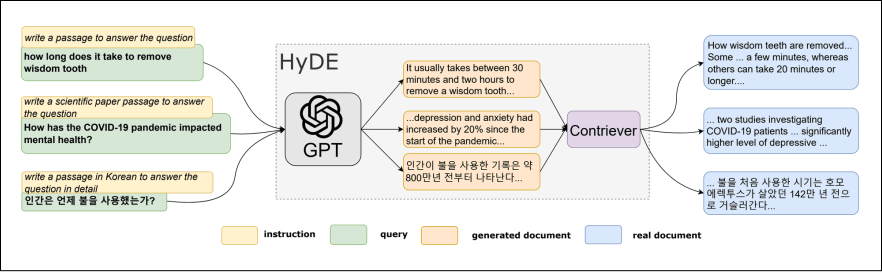
How HyDE works
Here’s a breakdown of the HyDE workflow:
Query processing: The user submits a query.
Hypothetical document generation: HyDE utilizes an LLM to create one or more “hypothetical documents” that address the query. These documents might not be factual or complete, but they capture the information a relevant document would contain. This generation process often involves prompting the LLM with instructions like “Write a short summary of a web page that answers the question...”.
Embedding creation: Each generated hypothetical document is then converted into a numerical representation called an embedding. This embedding captures the semantic meaning of the document.
Document retrieval: The system searches for existing documents in the collection whose embeddings are most similar to the hypothetical document embeddings. This process leverages vector similarity techniques.
Response generation: The retrieved documents are fed into the RAG model’s generation stage, where they are used to create a response to the user’s query.


Step-by-step implementation
Now, let’s dive into the provided code and understand how it implements HyDE:


1. Import necessary modules
We’ll import the required modules from the installed libraries to implement the HyDE:
These libraries and modules are essential for the subsequent steps in the process.
2. Set up the OpenAI API key
Set the OPENAI_API_KEY environment variable with your key:
Code explanation
Line 1: Set the
OPENAI_API_KEYvariable to an empty string and assign it to the environment variableOPENAI_API_KEYusingos.environ. This is where you should add your OpenAI API key.Lines 2–3: If the
OPENAI_API_KEYis still an empty string after the assignment, raise aValueErrorwith the message"Please set the OPENAI_API_KEY environment variable". This ensures that the API key is properly set before continuing with the program execution.
3. Load and split documents
Here, we load some example documents and prepare them for processing by the LLM. Since real-world documents might be lengthy, we’ll also perform text splitting to ensure they fit the LLM’s input limitations.
Code explanation
Lines 1-4: Initialize a list called
loaders, containing instances of theTextLoaderclass from LangChain. These loaders are used to load text files containing the documents to be processed.Lines 6-8: Iterate over each loader in the
loaderslist and load the documents using theload()method of each loader. The documents loaded from each loader are then appended to thedocslist.Line 10: Create an instance of the
RecursiveCharacterTextSplitterclass, specifying achunk_sizeof 400 characters. This splitter class is used to split large documents into smaller, more manageable chunks.Line 11: Call the
split_documents()method of thetext_splitterobject with thedocslist as input. This method splits each document into thedocslist into smaller chunks using the specifiedchunk_size. The resulting split documents are then assigned back to thedocslist.
4. Create a vector store
A vector store serves as a critical component for retrieval in HyDE. It allows us to store document embeddings and efficiently search for documents similar to a hypothetical document embedding.
Code explanation
Line 1: A vector store is created to facilitate information retrieval by indexing document embeddings.
5. Generate embeddings (single and multiple)
HyDE’s core functionality is generating embeddings representing hypothetical documents relevant to a user query. Here, we’ll explore generating both single and multiple embeddings.
Below is the implementation of single embedding generation.
Code explanation
Line 1: Initialize the embedding model and LLM. The
HypotheticalDocumentEmbedderclass combines the capabilities of an OpenAI language model (LLM) with OpenAIEmbeddings for creating embeddings, specifically for the"web_search"context.Line 3: Define a query about LangSmith. This query string will be used to generate an embedding that represents the query in a numerical format.
Line 5: Use the embedding model to generate an embedding for the
query. Theembed_querymethod processes the query string, converting it into an embedding vector that captures the semantic meaning of the query.
Below is the implementation of multiple embedding generation.
Code explanation
Line 1: Initialize an OpenAI LLM with specific parameters. The
n=3parameter specifies generating three completions per prompt, andbest_of=4means choosing the best completion out of four attempts.Line 3: Initialize the embedding model using the previously created LLM. The
HypotheticalDocumentEmbedderclass combines the capabilities ofmulti_llmwithOpenAIEmbeddingsfor creating embeddings, specifically for the"web_search"context.Line 5: Generate an embedding for a specific query. The
embed_querymethod processes the query string"What is LangSmith, and why do we need it?", converting it into an embedding vector that captures the semantic meaning of the query.
6. Query the vector store for HyDE
Before delving into the HyDE technique, it’s essential to understand how to query the vector store to retrieve relevant information:
Code explanation
Line 1: Define the search query as a string. This specifies the information we’re looking for in the vector store.
Line 2: Call the
similarity_searchmethod on thevectorstoreobject. This method performs the actual search within the vector store.
7. Generate a hypothetical document
In this step, a hypothetical document is generated using a defined prompt template:
Code explanation
Lines 1–6: A system message is defined as a prompt template to generate informative responses based on the context. It sets the tone for the AI language model to provide helpful and knowledgeable answers.
Lines 8–13: A prompt template is created using
ChatPromptTemplate.from_messages. It consists of two messages:System message: Defined above, it provides instructions and context to the AI language model.
Human message: Placeholder for the user’s question.
Line 15: An AI language model (LLM) instance is initialized using
ChatOpenAI. We specify the GPT-3.5 model and set the temperature to 0 for deterministic responses.Line 17: The context for generating the answer is set up by chaining the prompt template, LLM, and string output parser (
StrOutputParser).Lines 19–23: The context chain is invoked with the user’s question,
"What is LangSmith, and why do we need it?"The response generated by the LLM is stored in theanswervariable.Line 25: The generated answer is printed.
8. Return the hypothetical document and original question
Finally, the hypothetical document and the original question are returned using the HyDE chain.
Code explanation:
Line 1: A chain is created using
RunnablePassthroughto pass the hypothetical document and the original question through the HyDE system.Lines 3–7: The chain is invoked with a dictionary containing the user’s question,
"What is LangSmith, and why do we need it?". This triggers the execution of the chain, which processes the question along with the hypothetical document.
Try it yourself
You can practice executing this codes yourself in the Jupyter Notebook below: